Showing posts with label iPhone. Show all posts

Tuesday, February 21, 2012

KeyGrinder

So you and all your clan use one password for every stupid site that doesn't matter. I know you use a better/secure/unique p4sSw0rd for your banking sites but how can you possibly remember a different password for every account you have.

KeyGrinder is a program that provides theft-resistant passwords without you having to think much about them. Using the pwdHash algorithm you enter the website URL or account name and your simple easy to remember (and type) key/password. KeyGrinder then produces a reasonably secure password based on the website/account and your simple password. Then take this generated password and use it for the website's (so each of your sites/accounts have a unique password while you remember only one key.)

You end up with each website having a unique secure password while you remain the weak link (because you always use the same simple key to generate these passwords.) In other words, this process isolates risk from website/account security compromisses but will not protect you from angry girlfriends that you once trusted.

Download KeyGrinder from the Apple App Store, for iPhone and iPad. Or use the www.KeyGrinder.com website to generate the same passwords on the fly.

There is little useful documentation on the app but I did fine this blog post on how to use KeyGrinder. If you don't checkout the PwdHash project and think it is cool then most likely you will never seriously use KeyGrinder.

Security is inversely proportional to usability.

Thursday, June 2, 2011

The Presidential Agent books

The W.E.B. Griffin series The Presidential Agent is one of my favorite reads. Set in present day they are about honorable military men working for our counter in the fight against terrorism.

The are all long books, around 15 hours, with complex plots and none trivial characters. I have rated all six of these books 5 stars, my highest rating, because I often forget where I am driving to and don't want to turn the book off when I do get there.

As I recall the first book (By Order of the President) stands alone while the second and third continue the story. The Outlaws is book VI in the Presidential Agent series; it pretty much recapitulates the earlier books because the detailed history is required to follow the current action. Ofter the review of previous story point is tedious but I really enjoyed the way it was integrated into the story (because it was like going back to old friend and reminiscing.)

Book I, By Order of the President (2005) Book II, The Hostage (2006) Book III, The Hunters (2007) Book IV, The Shooters (2008) Book V, Black Ops (2009) Book VI, The Outlaws (2010)

Thursday, January 13, 2011

Extreme Characters and Soap Opera Testing

I'm reading Mike Cohn's book User Stories Applied: For Agile Software Development in order to switch my mind set into the Agile Development mode for the coming year(s). I recommend this book for people doing agile development.

Extreme Characters is a concept the book introduces. Mike correctly states that it will not be useful for most project but it is worth knowing about. I agree. But it got me thinking. Wouldn't Extreme Characters fit into Soap Opera Testing perfectly.

Cohn sites Djajdiningrat, J.P., W.W. Gaver and J.W. Fres, "Interaction relabelling and Extreme Characters: Methods for exploring aesthetic interactions." Symposium on Designing Interactive Systems 2000, 2000:66-71. See poster for the article.

A 5 minute google didn't turn up much of anything detailed on Extreme Characters other than what Mr. Cohn wrote/teaches. Food for thought and grounds for further research.

(Cool. I bought the Kindle ebook and read in on my laptop at work or on the Kindle at home. It is also sitting on my iPhone should I want to make a quick reference during a stand up.)

Tuesday, December 28, 2010

Killing iPhone apps

In order to resolve the iPhone Audible app issues one has to completely close the app to be sure it’s still not running on the back end with an error.
  1. Double click on the home button, this will bring up the multitask screen, the audible icon should be listed.
  2. Press and hold the audible icon. This will give the option to end the task.
  3. A minus sign will appear on the screen and you need to tap that.
  4. Once this is done, restart your Audible App, and it should now operate properly.

Saturday, February 20, 2010

New iPhone; Books and Podcasts, give a listen

So you have a new iPhone and have downloaded a bunch of free apps, now it is time to start some serious work with your phone. (See also my other iPhone blog entries.)

You need to subscribe to some podcasts to expand your working knowledge of stuff. I recommend starting with any/all of the podcasts from Grammar Girl's site, QD Now, www.quickanddirtytips.com. Subscribe from this site or search for the podcasts in iTunes.

The UC Berkeley course Physics for Future Presidents is outstanding. Every semester the course is made available via iTunes. Finding this and figuring out how to put it on your iPhone will be a learning experience well worth the effort.

Books on Tape/CD/MP3 are a natural for the iPhone. Here are a couple of sources to get you started.

  • CrimeWAV–short stories read by the authors; detective and crime fiction (adult content).
  • Jack Wakes Up–contemporary hard-boiled fiction set in San Francisco by Seth Harwood.
  • Scott Sigler–several books all read by Scott. Start with Ancestor for SciFi Horror or The Rookie for sports/action/SciFi.
  • PodioBooks–this is where I discovered Seth Harwood and Scott Sigler. Download and listen to the book then donate because you like the book and want to support the author.
  • Decoder Ring Theater–radio-style half hour shows. I love the Black Jack Justice series.
  • Audible.com–buy normal books for download listening. The first book is free, promotional code GRAMMAR.
  • Your Local Library–physically check out the books on CD and use iTunes to add them to your library. Make a "music" playlist of the imported tracks and sync the playlist to your iPhone.

Wednesday, February 10, 2010

Lose It! iPhone App

I have been using the Lose It! iPhone app for one year. It is the key to my being able to change my behavior resulting in significant weight reduction (30 pounds). Mahalo Sharon for the "track the foods you eat" suggestion. OXOX

Lose It! now has a website that provides additional resources over the initial version I started with. I have signed up and have connected it to my Facebook as well.

So if you are a Lose It! user I invite you to add me to your loserit friends list.

Friday, January 15, 2010

Settling in after surgery

Settling in after surgery went well. Sharon was great as usual. She anticipated my needs and is always looking for ways to make me comfortable.

Here are a some specifics that we did, hope others will find it helpful.

  • Joined Facebook to keep friends and family informed. Unexpected benefit of support and love from everyone.
  • Used the iPhone to listen to podcasts, Origin of Species, played Bejeweled, research the drugs they were giving me.
  • iPhone alarm set to tell us when the medications are to be administered. (Sharon's cell phone bell was way harsh in the middle of the night, switched to iPhone.)
  • Clipboard to record/log medical events.
  • Record blood pressure every morning
  • Record pain level at each medical event.
  • Weight each morning.
  • New bed with grip-able headboard facilitates moving in bed. I can push and put and lift my body quite easily. The bed is farely high so I don't have far to go from sitting on the edge of the bed to standing, not an issue lowering myself onto the bed. In the hospital it was work to stand up.
  • Moved the furniture in the dining room and music room into the middle so that I can walk a figure eight track without having to stop or turn corners.
  • Sleeping flat on my back is comfortable! What a pleasure to be able to lay in bed for hours on end without the incursion of pain and discomfort.
  • Dean has been sleeping between my leg so I will not need a big foam triangle.
  • Removed all the rugs because they want you to minimize tripping hazards. I like them up because now I can walk from room to room with my kick-ass walker without having to navigate speed bumps.

Thursday, December 24, 2009

TED Ideas worth spreading

My buddy Ted visited last night and turned me on to this site that features short talks by smart people about their passions. Can you say YouTube for Illuminati?

TED.com—Technology, Entertainment, Design

I've added TED to my podcast feed. The buccaneer scholar sails on.

Friday, November 13, 2009

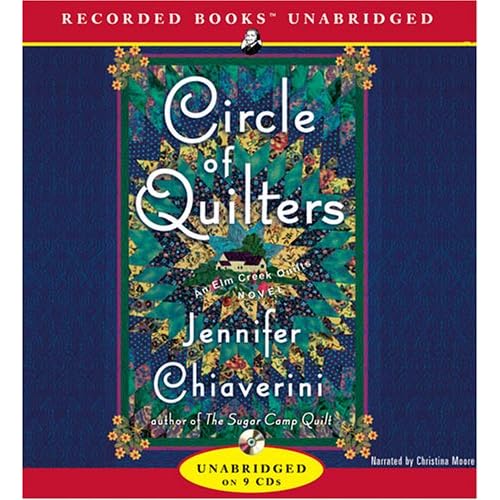
Circle of Quilters

This week I am listening to Circle of Quilters by Jennifer Chiaverini. I am thoroughly enjoying it (currently half way through) and find that she effectively captures the pleasure and personal fulfillment of quilting.

The chapter about the Russ hits home. I have personally experienced the social bias and sexism he encountered. However, the quilt shop where I got started was very inviting and encouraging, not once did I feel unwelcome (mahalo! Mel and Margrit). After reading this chapter I think I may check out some Internet quilting bees when I get back into serious quilting again.

Some of the women in the book are a bit whiny such that I wish I could grab them and tell em' to brace up and move on, Fuggedaboudit!. But as Matt always says, "it's in the script." This is just effective storytelling that has sucked me in, allowing me to care about these women.

Ms. Chiaverini has over a dozen Elm Creek Quilts novels. I look forward to reading more.

Saturday, September 12, 2009

Eusocial Networking

One of my favorite authors is Scott Sigler. Scott just won a Parsec Award for his novella EUSOCIAL NETWORKING at Dragon*Con 2009.

I am including a link to the short story (50 minutes) for you. The audio file starts with a ten minute introduction that explains a bit about Scott and the Obsidian podcasts followed by Scott reading his story. Click to download/listen to the MP3 file. I subscribe to both authors podcast feeds via iTunes and listen on my iPhone.

You don't need to be familiar with the J.C. Hutchins 7th Son books for the story to work. But if you want to find out about the Saudi nuke and the project financier (A.U. Rookman) then listen to the 7th Son books (really just one very long story in three volumes).

Tuesday, March 3, 2009

bluetooth headsets; They CAN listen if they want.

Security is inversely proportional to usability. Using a bluetooth headset with your cell phone is easy to set up and use. Most devices use the password 0000. When you forget your password it isn't hard to find out what it is by doing a google search.

If it is easy for the non-technical person to setup their phone is it child's play for a professional to take advantage of the situation.

Tuesday, February 17, 2009

iPhone hard boot

Marie told me about forcing a hard/cold boot of your iPhone when it is acting up or frozen. This will not destroy any of your settings or apps.

Does iPhone appear frozen or stuck? Press and hold the Home button for at least 6 seconds to close a frozen application. Then...

Restart the iPhone. To turn it off, press and hold the Sleep/Wake button until the red slider appears. Slide your finger across the slider to turn off iPhone. [[A preventative measure is to power down the iPhone weekly just to make sure all the misbehaving apps get shut down and the memory freed.]] To turn iPhone on, press and hold the Sleep/Wake button until the Apple logo appears. If that fails...

Reset the iPhone. Press and hold the Sleep/Wake button and the Home button at the same time for at least 10 seconds. [[Both buttons have to be presses simultaneously, video gaming skills required. Ten seconds is the minimum, you may need to hold it for 30, 45 or longer.]] During this time, a red "power off" slider may appear and the screen may go black, but do not release Sleep/Wake and Home buttons until the Apple logo appears. If that fails...

Ask Apple.

[[Jason @ AppleStore Walnut Creek suggested allowing the battery to run down once a week to improve performance and life span. Also, power down the iPhone weekly or whenever it is acting funny.]]

Last Resort; Restore Software, it may be scrambled.

  1. Sync (backup) iPhone
  2. iTunes to "Restore" the iPhone
  3. Select "Setup as a new phone" (do not restore from backup, backup includes the munged data)
  4. Sync iPhone

Sunday, January 11, 2009

Shruti Box

I've always loved a good drone. A shruti box is a harmonium like instrument from India that produces a drone when the bellows are pumped with the hand.

Today a load a shruti box app onto my iPhone. It seems like it is going to serve the functions I was considering paying a over $100US for an electronics box from India.

Check out this "real" shruti box demo on YouTube.